
My Wealth 1.5.0: give your wealth a direction
Released on 14 August 2026, My Wealth 1.5.0 introduces a new way to track your financial projects. This version adds investment goals, modernizes desktop navigation and makes the application easier to discover when creating a wealth file.
What’s new at a glance
- Create goals suited to different wealth projects.
- Define precisely which assets are included in each goal.
- Calculate the investment effort required to reach a target.
- Connect your goals to your monthly budget.
- Track their trajectory and adjust your assumptions over time.
- Enjoy clearer new sidebar navigation on desktop.
- Discover My Wealth more easily with the “Getting started” journey.
New investment goals
The main new feature in My Wealth 1.5.0 is investment goals. They turn an intention—building savings, strengthening an allocation or preparing additional income—into a measurable project tracked directly in the application.
Three main categories of goals are available.
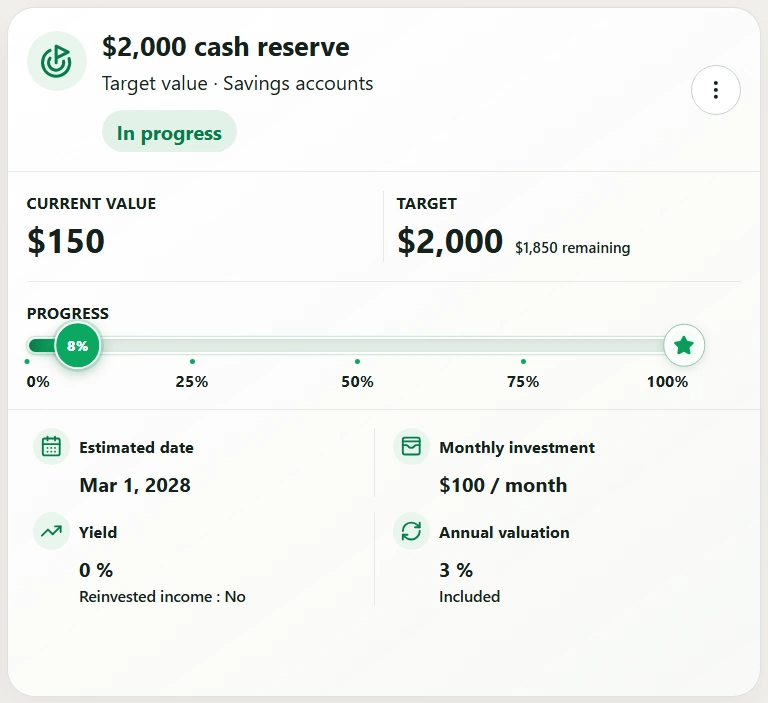
Reach a target value
You can define the amount you want a portion of your wealth to reach. My Wealth then estimates progress toward that goal, taking into account current capital, planned contributions and the selected return assumptions.
This type of goal can, for example, be used to build long-term capital, prepare for a major purchase or reach a defined amount across a group of investments.
Reach a minimum allocation
A goal can also be used to increase the share of an asset category in your wealth. You define a minimum allocation to reach, and My Wealth tracks its evolution relative to the rest of your wealth.
This approach is particularly useful for gradually rebalancing a portfolio without losing sight of the overall composition of your wealth.
Grow passive income
Finally, you can define a monthly passive-income goal. The application tracks the income generated by the selected scope and compares it with the defined target.
Passive-income goals also accept a zero or negative target. This makes it possible to represent special situations without artificially requiring a positive value.
Choose the precise scope of each goal
Not every project necessarily applies to all your wealth. My Wealth 1.5.0 therefore lets you define a suitable scope for each goal.
A goal can apply to:
- an asset family;
- an investment account or holding structure;
- a country;
- a currency;
- a specific asset;
- or a custom selection of several assets.
Country and currency lists are built dynamically from the contents of the wealth file. The number of assets included in the scope is also shown, so you can immediately understand what contributes to the calculation.
When only one choice is possible, it is selected automatically. Options that require data not yet present in the wealth file remain visible but are disabled with an explanation. The interface therefore helps you understand what needs to be completed instead of simply hiding unavailable possibilities.
Plan the required effort
Two planning methods are available for goals that require regular investments.
Define a monthly investment
You can directly choose the amount you want to invest each month. My Wealth then projects the goal’s trajectory based on this regular contribution and the defined assumptions.
Define a target date
You can also specify the date by which you want to reach the goal. The application automatically recalculates the theoretical monthly amount required to meet that deadline.
The target date remains optional, so you can track a goal without imposing an artificial deadline.
Assumptions suited to each project
A goal projection can use the observed annual net return within its scope or a custom assumption. All assets with a positive net value are included in this calculation.
You can also specify whether generated income should be reinvested. For target-value and allocation goals, a separate annual assumption can be applied to changes in asset value.
Separating return, reinvestment and valuation makes it possible to build scenarios that more closely reflect the strategy actually being considered.
A direct connection with the budget
An investment goal can be linked to a budgeted account. My Wealth then creates a corresponding budget entry so that the investment effort becomes part of monthly planning.
The calculated amount and the budget remain synchronized. You can nevertheless manually adjust the amount for a particular month and then return to the automatic calculation if needed.
To prevent duplicates, the same goal can only be linked once to a budgeted account. When a goal is paused or has already been reached, no new occurrence is generated in the budget.
Track the trajectory of your goals
Goal cards show the essential information needed to understand the situation: progress, estimated trajectory, number of assets concerned and the main assumptions used.
A goal can be paused and resumed without being deleted. Its display adapts to different screen sizes and respects privacy options when wealth amounts are hidden.
Creation and editing have also been refined with more explicit validation, improved selectors, more consistent icons and tooltips, clearer projection feedback and completed translations.
Completely redesigned desktop navigation
The horizontal navigation and contextual rail have been replaced by a hierarchical, collapsible sidebar.
This new organization provides a clearer view of the application’s main areas and their subsections. It makes it easier to move between wealth status, passive income, analyses, portfolio and budget.
Portfolio search is now integrated into this navigation. Your display preference is remembered so that you return to the same organization the next time you use the application.
A new “Getting started” journey
New wealth files now include an optional discovery journey. It provides direct shortcuts for creating the main components of a wealth file or importing existing investments.
This journey can be hidden when you no longer need it and restored at any time from the Help menu.
New wealth files open directly in the Situation view. The main views remain accessible even when the wealth file does not yet contain any assets or liabilities, with consistent empty states that guide you as information is added progressively.
Many reliability and display improvements
My Wealth 1.5.0 improves support for incomplete portfolios and portfolios made up only of liabilities. Their contents are now handled correctly in the portfolio and debt analyses.
Responsive behavior has also been strengthened on many screens:
- home page;
- desktop navigation;
- budgeted accounts;
- flow diagrams;
- dialogs;
- smartphone display.
Finally, several internal parts of the application have been reorganized to make maintenance easier without affecting compatibility with saved wealth files.