
From your monthly budget to your investment capacity
Your wealth can grow while your current account runs short of cash. Conversely, an available balance today does not mean all of it can be invested: the month's bills still need to be paid.
My Wealth brings together planned income, expenses, transfers and investments to help you anticipate account balances. You can compare this budget with the effort planned for your goals, in the same file as your wealth.
1. Distinguish monthly flows from money already available
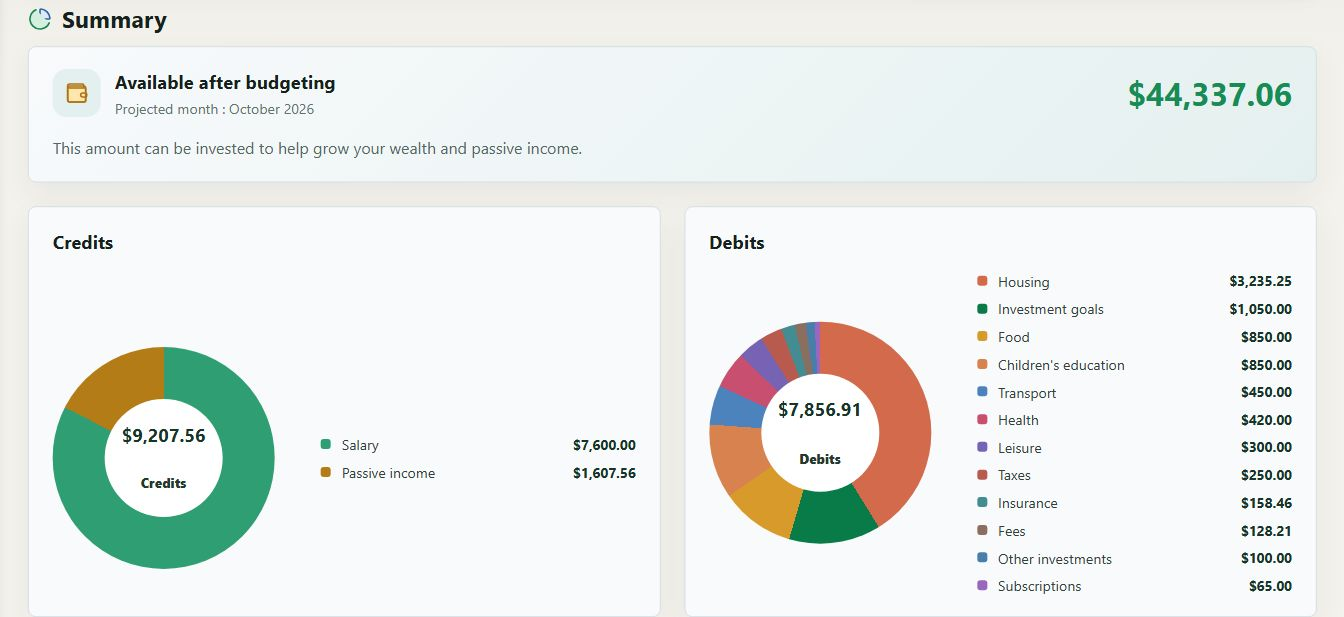
The screenshot shows a fictional dollar-denominated budget for October 2026. Here is how to read some of the figures in this summary:
| Displayed indicator | Amount | What it tells you |
|---|---|---|
| Monthly credits | 9,207.56 USD | Planned inflows, including salaries and passive income |
| Monthly debits | 7,856.91 USD | Planned outflows, including expenses and investments |
| Including goal contributions | 1,050 USD | Part of the debits, not to be deducted again |
| Available after budgeting | 44,337.06 USD | A summary that also takes account balances into consideration |
The difference between credits and debits is 1,350.65 USD. It is not the available amount of 44,337.06 USD: that figure includes money already in the accounts and the items used in the budget calculation.
This distinction avoids confusing capacity generated by monthly flows with a cash reserve already built up. The demo figures illustrate how the application works; they are not a recommended budget.
2. Schedule due dates for the relevant accounts
You can define a monthly salary, annual insurance payment, recurring expense or planned investment. Each entry retains its category, currency, frequency and account.
The chronological projection shows their effect on balances. It helps identify an account that may run short of cash before a due date, even if the total held in other accounts seems sufficient.
You therefore retain two complementary views: the monthly summary for the whole budget and the planned movements for each account.
3. Separate transfers from income and expenses
Moving money from a current account to a savings account changes where the funds are held without creating new income for the household.
My Wealth represents this movement as a transfer between accounts. This distinction avoids counting the same amount twice and lets you anticipate the effect on both the source and destination accounts.
For example, a salary can cover the month's bills, followed by a transfer to savings and an investment. The projection helps check that their timing remains compatible with the available balance.
4. Compare your goals with the contributions actually planned
A goal can require a monthly contribution even when that payment has not yet been linked to a budget account.
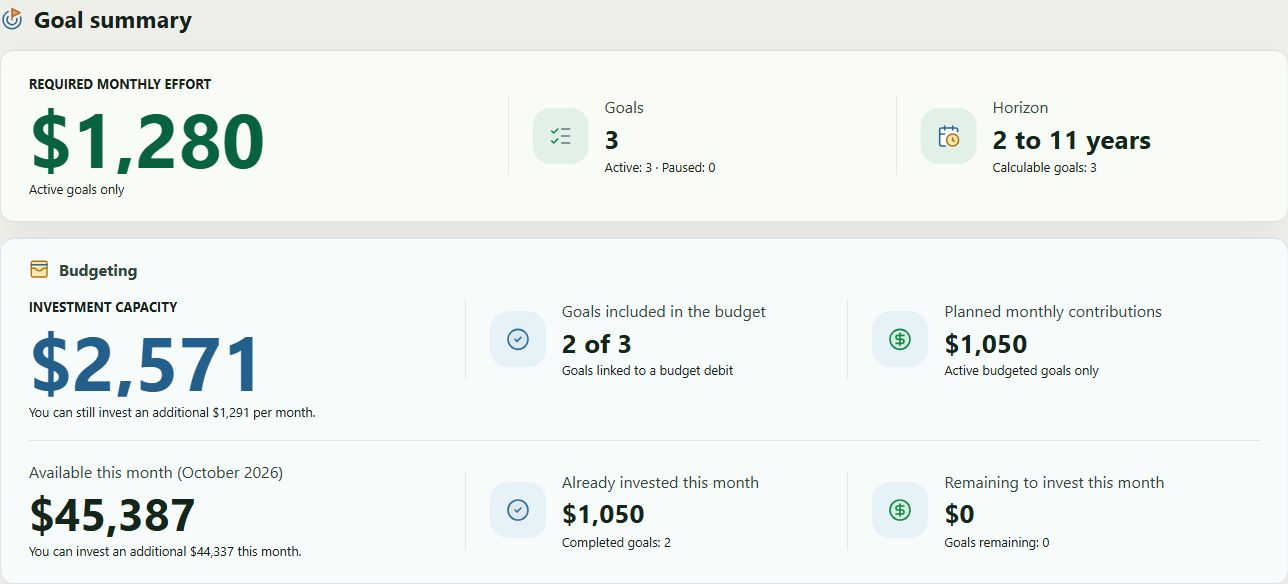
In this example, the three goals represent 1,280 USD in monthly contributions, but only two are linked to the budget, accounting for 1,050 USD in planned contributions. The difference shows an amount defined in the goals that is not fully reflected in the budget.
The summary also distinguishes the amount already invested from the amount still to invest. This lets you track the month's progress without deducting an already completed contribution again.
The Investment goals page shows how contributions affect longer-term projections.
5. Adjust the month without rewriting the entire schedule
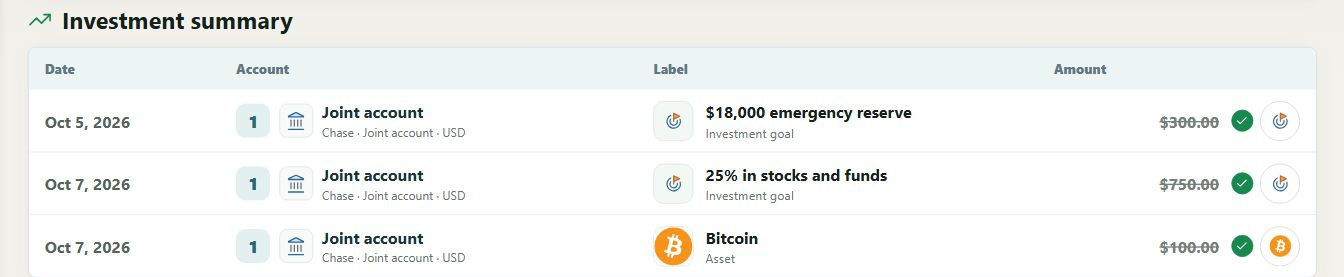
When a flow takes place, you can mark it as completed and retain the amount for that month. An expense that differs from its usual amount can therefore be adjusted without changing every future occurrence.
The monthly budget guide explains entries, frequencies, transfers and marking occurrences as completed.
6. Check the calculations before deciding on a contribution
A missing conversion or an inconsistency between accounts can make a result incomplete. The Checks panel brings together issues to correct; an incomplete amount should not be treated as certain investment capacity.
The budget remains a plan based on the data you enter. It does not trigger bank transfers. It complements wealth tracking without confusing expenses, cash flows and changes in asset value.
To organise your own accounts, download My Wealth and see the getting started guide.