
Preparing your monthly budget
The budget builds a theoretical projection from current or joint accounts already recorded. It does not replace their actual balance: the lines describe what should come in, go out, or be invested during each month.
1. Adding the account that receives and pays
- First add the account under Portfolio > Savings accounts.
- Open Budget, then Add an account.
- Choose the current or joint account.
- Enter the opening balance if the projection should include money already available.
The account card and all its lines are displayed in that account's currency. The global view then converts the accounts when necessary.
2. Adding independent income or an expense
In the account menu, select Add income or Add expense, then enter:
- Name, such as
SalaryorFood; - Category;
- Frequency, such as monthly or annually;
- Next occurrence;
- Currency and Amount.
An annual expense should not be manually divided by twelve if you want to see the actual payment month: choose Annual and its next date. The monthly average may then differ from the result for the displayed month.
3. Reusing wealth data
The same menu can create a linked line:
- Add income from an asset uses rent, interest, or a dividend;
- Add residence expenses uses its charges;
- Add a liability expense uses a monthly payment;
- Invest in an asset or Pay into a support describes planned saving;
- Add an investment goal uses the monthly effort planned by the goal.
The line remains linked to its source item. Use its edit action if you need to allow a budget-specific adjustment.
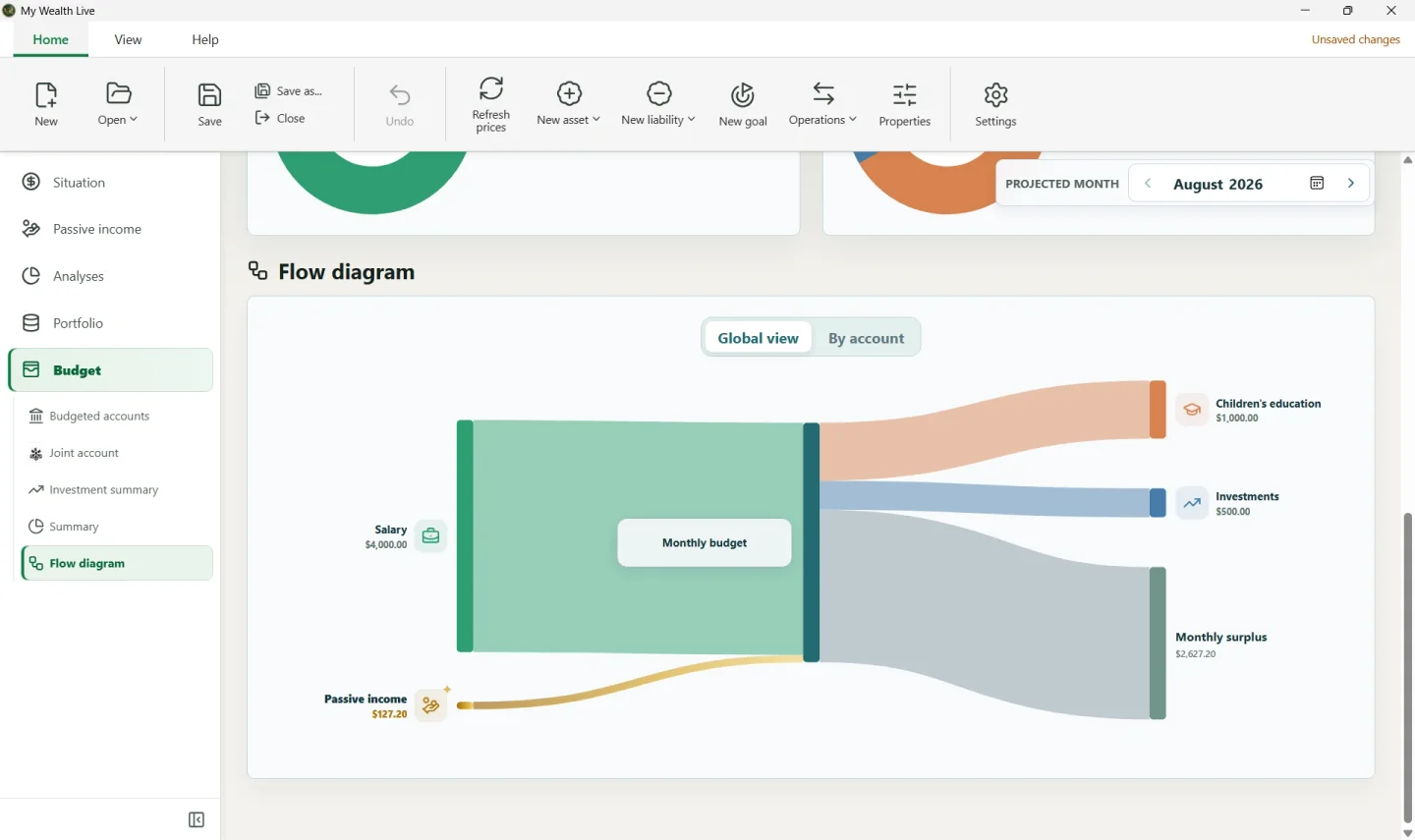
Demonstration example: with USD 4,000 in salary, USD 1,000 for education, USD 500 in investments, and approximately USD 127 in passive income, the monthly result also depends on other lines and transfers; do not enter the calculated total as additional income.
4. Transferring a surplus between accounts
First add both accounts to the budget. In the destination account, choose to add another account's surplus, then select the source account. My Wealth transfers only its positive surplus according to the calculated order.
A cycle—A sends its surplus to B and B sends its surplus to A—prevents calculation. Remove one of the transfers or choose one-way circulation.
5. Reading the month and projection
The Monthly result concerns the selected month; the Monthly average spreads frequencies over a longer period. The diagram separates external income, expenses, investments, transfers, and surpluses.
Browse the months in the Budget projection to identify the first insufficient balance. A recommendation or diagram marked as partial means that a conversion is missing or that a cycle prevents part of the calculation.
If a rate is missing, the result may be partial. Enter the conversion using the suggested action or under Properties > Exchange rates.