
Query your wealth with local AI or through MCP
My Wealth lets you use artificial intelligence to explore and understand your wealth while retaining control of your data.
On Windows, an AI assistant runs directly on your computer. You can ask natural-language questions about the currently open wealth file.
Would you rather use your own assistant or another compatible tool? My Wealth also provides a local MCP server for connecting external clients according to the permissions you define.
Local AI for protecting the privacy of your wealth
A wealth file contains especially sensitive information: asset values, property, investments, debt, income and financial goals.
That is why the My Wealth AI assistant is designed to run locally on your computer. Questions can be processed directly on your PC without requiring your wealth to be sent to a remote AI service.
You gain a conversational interface while staying true to My Wealth's local-first approach: your wealth file remains under your control and essential features do not depend on a remote service.
Simply ask My Wealth your questions
The built-in assistant lets you query your wealth in natural language from within the application. It can provide information, summaries and analyses based on data available in the open file.
The wealth file remains the source of truth. The local agent uses the same controlled business interface as other local integrations.
For example, you can ask:
- what the net value of the open wealth file is;
- which assets contribute most to passive income;
- how investments are allocated by family, currency or owner;
- which liabilities contribute most to debt, or which dimension weakens its score;
- how an investment goal is progressing;
- what trend emerges from the available history.
Accuracy depends on the data present and the permissions granted. If budget income is missing, for example, repayments cannot be compared with income and the assistant must retain that limitation in its answer. It neither replaces missing information nor provides personalized financial advice.
Create and update your wealth in natural language
The local assistant is not limited to reading existing information. When you explicitly request an action and editing permission is enabled, it can prepare the creation or update of wealth items.
You can ask it to:
- add property, an investment or a loan using the information provided;
- update the value, quantity or properties of an existing asset;
- create an owner, holding structure or custodian;
- define or change an investment goal;
- add a budget account, expense, income or transfer;
- mark a budget occurrence as completed.
The assistant follows the same business rules as the interface. If required information is missing or a target is ambiguous, it must ask for clarification instead of inventing a value or identifier.
Levels suited to your computer's capabilities
Not everyone has the same hardware.
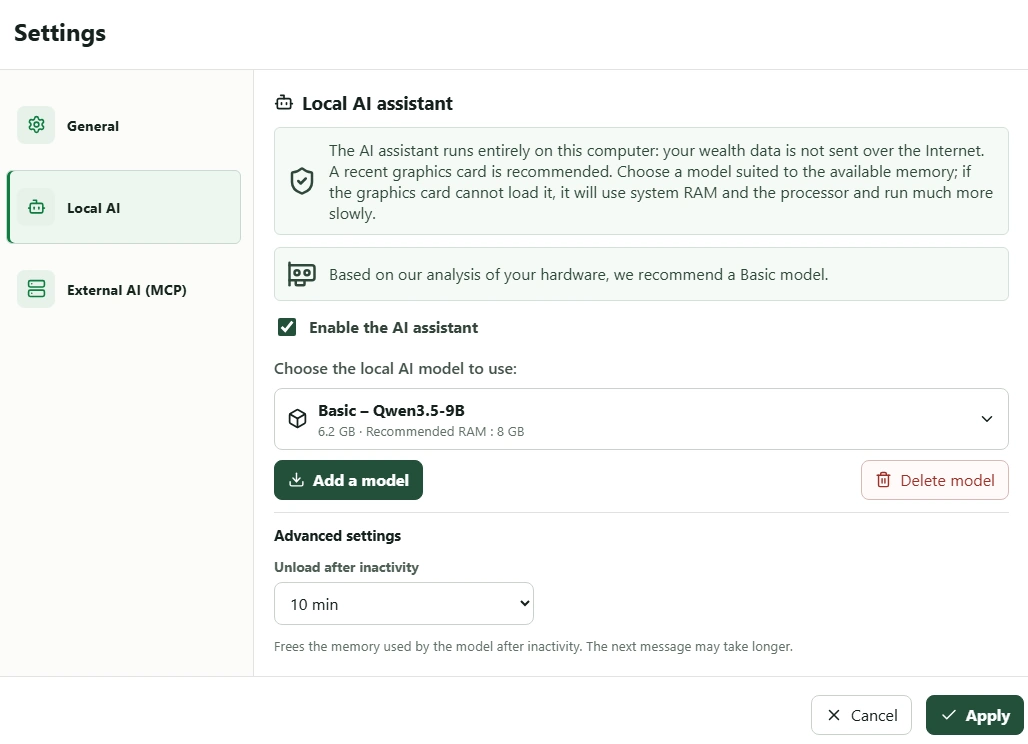
My Wealth supports three model levels—basic, medium and advanced—suited to different hardware capabilities. The models actually offered depend on the catalogue available in the application.
Model selection and installation are integrated into My Wealth. On Windows, the application recommends a level based on detected hardware. This helps choose a suitable model but cannot guarantee identical performance on every configuration.
Connect your own tools with MCP
The built-in assistant is not the only way to use AI with My Wealth.
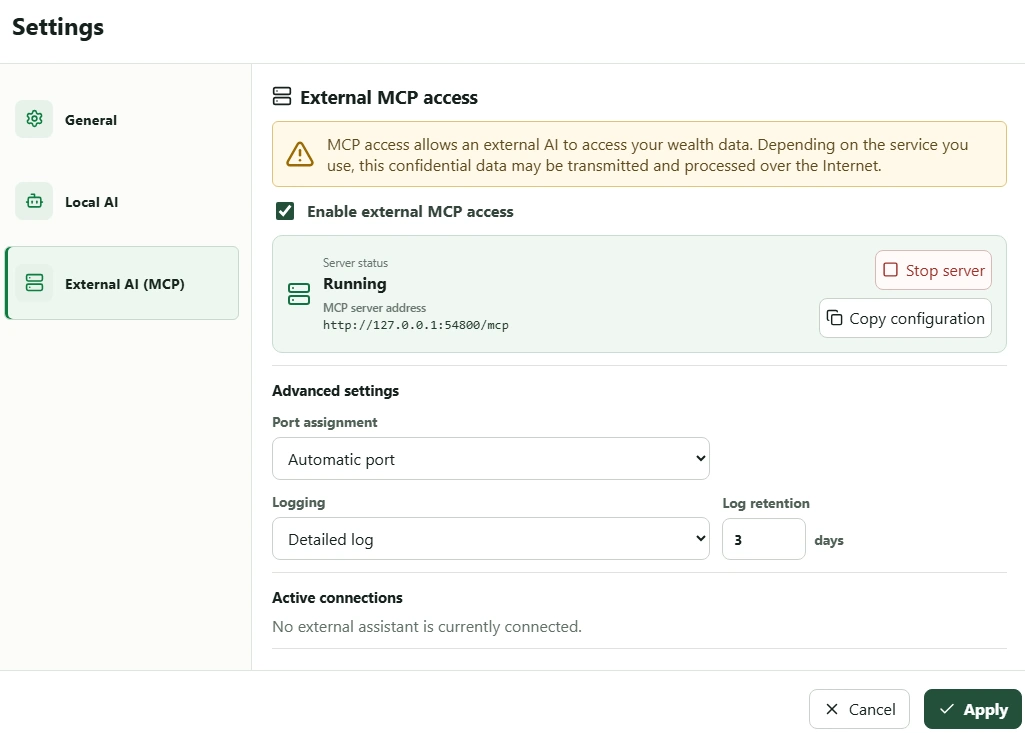
On Windows, the application can also host a local MCP server. MCP, or Model Context Protocol, lets a compatible client discover the features exposed by My Wealth and interact with the open wealth file according to granted permissions.
You can therefore use your preferred AI assistant or another MCP-compatible tool without manually exporting your wealth data.
Understand what “local server” guarantees
The My Wealth server listens locally on your computer, uses authentication and limits exposed tools to the permissions of the open wealth file.
This protection covers access to My Wealth. It does not determine what an MCP client subsequently does with information it receives. An assistant backed by a remote service may transmit the data needed to process your request to that service.
If you want all analysis to remain on your computer, use the built-in local assistant or an MCP client whose processing is also local. Choosing the client and reading its privacy policy remain important.
Choose precisely which access is allowed
The built-in AI assistant and external MCP clients use separate permissions. You can independently control read and edit rights.
Using the local assistant does not automatically enable external MCP access. Local read access is enabled by default, while assistant edits and external MCP access are disabled by default.
Every change remains under your control
Reading a wealth file and editing it are different operations. My Wealth separates these permissions so an assistant cannot freely alter your data.
Even when edits are allowed for the local assistant, every write requires explicit confirmation before execution.
Deletion and other destructive operations are also prepared by identifying their consequences and dependencies before the action. You retain the final decision whenever an operation would actually change your wealth.
Your wealth file remains the source of truth
Artificial intelligence does not change My Wealth's fundamental principle.
Your wealth remains stored in the .mywealth file whose location you control. Local AI and MCP provide new ways to interact with it, but never replace it as the source of truth. Permissions, validations and confirmations remain enforced by My Wealth regardless of the model's response.
For an overview, discover My Wealth personal wealth management software.
Two approaches for different ways of working
Want to ask questions directly from My Wealth? Use the built-in local AI assistant.
Already use an MCP-compatible assistant or tool? Enable the local MCP server and choose the permissions you want to grant.
You can also continue using My Wealth without either feature. AI remains an optional tool, not a requirement.
Optional AI integrated with My Wealth's controls
The local assistant and MCP server are not required to use the application. When enabled, they rely on the same calculations and business rules as the interface instead of reading or editing the raw file directly.
This architecture adds conversational interaction without creating a second interpretation of your wealth.
Try My Wealth for free
You can discover My Wealth's main features directly in your browser with the online demo, with no installation required.
The local AI assistant and MCP server are available in the Windows experience.