
Wealth management software comparison: which should you choose in 2026?
My Wealth, Finary, Wealthfolio, Capitally, Kubera and Portfolio Performance let you track finances or investments, but do not meet exactly the same needs. Some prioritise account synchronisation; others excel at performance calculations; others emphasise local control of data.
The choice is therefore not just about which application has the most features, but how you want to organise, update and understand your wealth day to day.
This comparison presents the benefits and limitations of six solutions, then explains My Wealth's particular role: local wealth management software with free essential features and built-in AI able to interact with your wealth and, through My Wealth Live, financial data services.
Transparency: this article is published by Indrik Software, the publisher of My Wealth. The other applications are presented using their official documentation available on 24 October 2026. This is neither an independent ranking nor an exhaustive hands-on test of competing products. Features and prices may change.
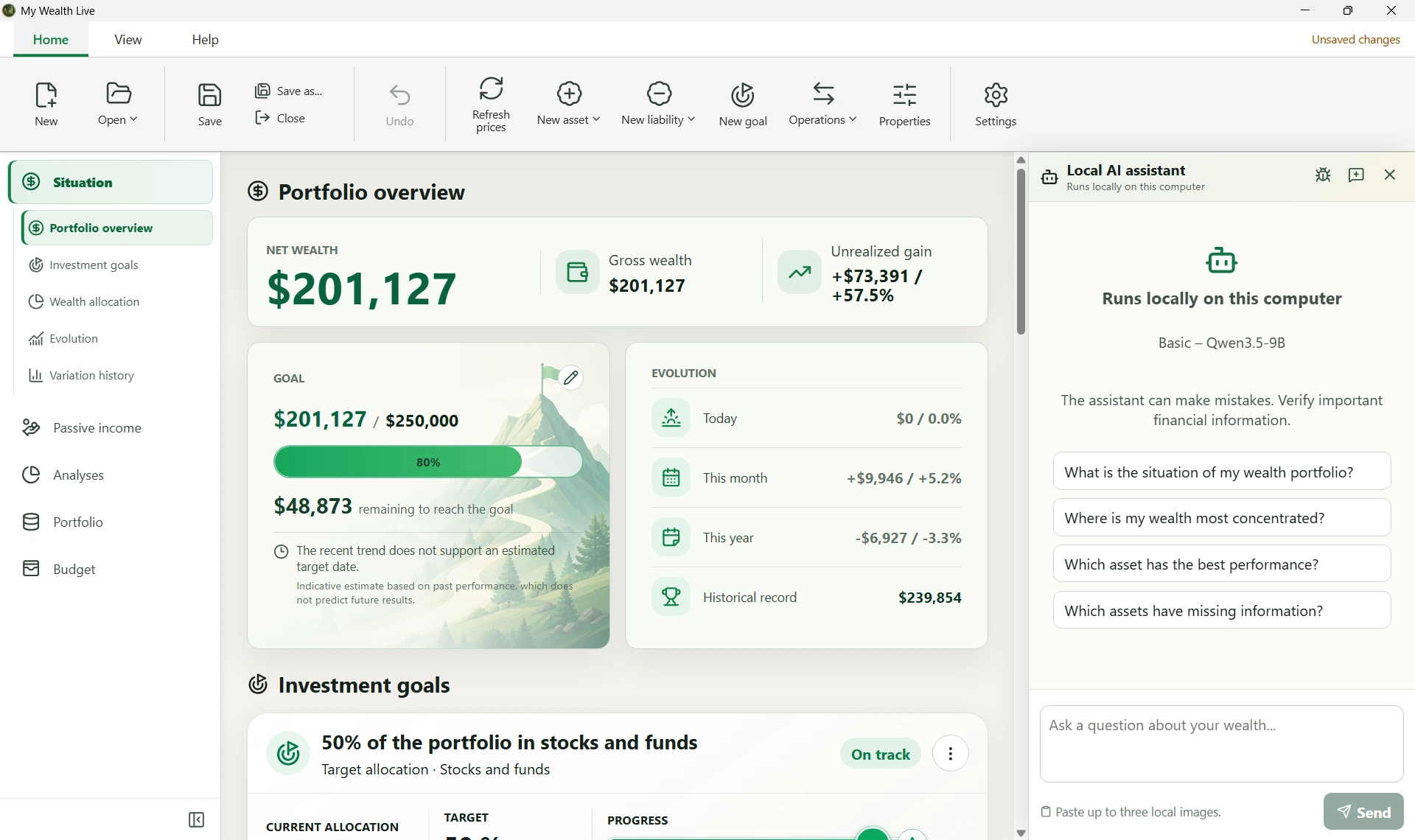
1. Six applications, six ways to manage your wealth
| Solution | Main approach | Updating data | Consider first if… |
|---|---|---|---|
| My Wealth | Complete, private wealth management under your control, with optional encryption. | Manual entry, smart import using local AI; optional prices and catalogues with Live | You want to connect wealth, debts, budget, goals and local AI without a mandatory bank connection. |
| Wealthfolio | Open-source, local-first software with optional synchronisation | CSV imports, AI assistant, price providers and connections to compatible brokers through Connect | You prioritise open source, portfolio analysis or optional synchronisation. |
| Capitally | Investment analysis application with data encrypted on the device | Structured imports of transactions, assets and prices; no direct bank account connections | You want detailed analysis of returns, fees, taxes and transaction history. |
| Kubera | Online wealth dashboard focused on diversified wealth | Connections to compatible institutions, manual updates and AI-assisted document or screenshot imports | You want a connected international wealth overview with advanced sharing features depending on the plan. |
| Finary | Online wealth and personal finance tracking service | Synchronisation of compatible accounts and manual additions | You want automatic consolidation of accounts, investments and expenses. |
| Portfolio Performance | Open-source desktop software focused on investments | Transactions, file imports and quote providers | You prioritise detailed transaction tracking and return calculations. |
To compare access conditions too, here are the same practical criteria for each solution:
| Solution | Free features and paid options | Platforms | Wealth data storage |
|---|---|---|---|
| My Wealth | Free wealth management; optional paid Live service | Windows, Linux and Android | Local, optionally encrypted file; optional desktop-to-smartphone synchronisation through your chosen provider, such as OneDrive or Google Drive |
| Wealthfolio | Free application; optional paid Connect service | Windows, macOS, Linux, iOS and Android; self-hosted version | Local database; optional encrypted synchronisation with Connect |
| Capitally | Subscription; free trial | Web application on desktop and smartphone, installable from the browser | Data encrypted on the device; encrypted copy synchronised online |
| Kubera | Subscription; trial available | Web application on desktop and smartphone, installable from the browser | Data hosted online; encryption at rest and in transit |
| Finary | Limited free plan; subscriptions for advanced features | Web application, iOS and Android | Data hosted online; encryption at rest and in transit |
| Portfolio Performance | Free desktop software; paid mobile options | Windows, macOS and Linux; iOS and Android viewing application depending on country | Local file; file provider of your choice for mobile access |
2. Three decisive questions before choosing
1. Where will your data be stored?
With My Wealth, wealth is saved in a .mywealth file whose location you choose. The application works without a mandatory account or imposed cloud storage, and the file can be encrypted. This provides direct control over the document and its backups.
You can also synchronise the document between desktop and smartphone using your chosen file provider. OneDrive and Google Drive are examples; you can use an equivalent service compatible with your devices. The backup and synchronisation guide explains how to access an up-to-date file on your devices.
This model is not exclusive. Wealthfolio also keeps data in a local database and offers optional encrypted device synchronisation. Portfolio Performance stores data locally. According to its publisher, Capitally encrypts data on the device and synchronises encrypted copies: a web application should therefore not automatically be equated with the publisher having access to readable information.
Finary and Kubera prioritise a connected experience and online consolidation. This approach may be more convenient when several accounts need updating without regular intervention. The choice involves balancing document control, ease of synchronisation, backups and required services, rather than reaching a universal verdict on security.
2. How do you want to update your positions?
Bank or broker synchronisation avoids some data entry: this is a real advantage for Finary, Kubera and the connections available through Wealthfolio Connect. It nevertheless depends on each institution's coverage and the data actually retrieved.
Another option is to provide a statement or screenshot yourself, then check the changes detected. This is the role of My Wealth's smart import on Windows: local AI can analyse an image, CSV or another compatible format, match information to existing wealth data and prepare a review to check. You can launch this import directly from the relevant holding account's menu. The Update Centre also lets you find scheduled updates.
My Wealth does not automatically synchronise bank transactions. This is a limitation if you want daily updates without intervention; it is also a relevant way to work if you do not want to connect your accounts or your institution is unsupported by an aggregator.
It would be inaccurate to present screenshot importing as exclusive to My Wealth: Kubera also documents AI imports of PDFs, CSVs and screenshots with a review step. The two approaches differ notably in where analysis runs and how it fits into wealth tracking.
3. Are you mainly looking for an investment portfolio or a complete wealth picture?
An equity portfolio often needs precise analysis of purchases, sales, fees, currencies and returns. Portfolio Performance and Capitally give these calculations considerable attention; Capitally notably documents TWR and MWR/XIRR returns and attribution of currency effects.
For a broader picture covering property, loans, savings, investments, SCPI funds, precious metals, income, budget and goals, My Wealth offers a shared model bringing assets and liabilities together. Wealthfolio and Kubera also cover many asset classes. The right criterion is therefore not a simple ‘property: yes’ tick, but the quality of the process for your assets, the data you can enter and the resulting analyses.
3. What makes My Wealth different in practice
Wealth you control, without a mandatory subscription
My Wealth lets you create and manage local wealth data for free: assets, liabilities, histories, passive income, analyses, budget and goals. Connected My Wealth Live services are optional. If you do not use them, you can still open your file, enter values, view analyses and save changes.
This organisation is useful when tracking data spread across several banks, brokers, properties and holding structures. Owners, holding accounts, institutions and currencies maintain an overall view without reducing wealth to a single securities account.
Local AI integrated into operations, not just questions
On Windows, My Wealth includes its own process for installing and configuring local AI models. The application offers profiles suited to the computer's capabilities, with GPU and CPU usage settings. You do not need an account with a remote AI provider to use this feature.
The assistant can read, explain and, with permission, prepare actions on the open wealth file. Possible requests include:
- ‘What share of my wealth is held in property, and what are my main concentrations?’
- ‘Which assets contribute most to my passive income?’
- ‘Add this property with its value and owner.’
- ‘Prepare an investment goal to reach a target allocation.’
- ‘Add this planned expense to my budget.’
Data is accessed through controlled domain-specific tools. Changes require appropriate permissions and explicit confirmation; an AI answer alone cannot change the file. Deletions and destructive operations undergo additional checks. Results depend on the model used and the information actually available.
Wealthfolio also offers local AI, notably with Ollama, an assistant able to call tools, guided CSV imports and an MCP server. The distinction we emphasise is therefore not ‘AI versus no AI’, but My Wealth's own operational process: a model managed inside the application, broad wealth management and an assistant integrated with creation and update functions across different wealth objects.
Local AI that can also use My Wealth Live
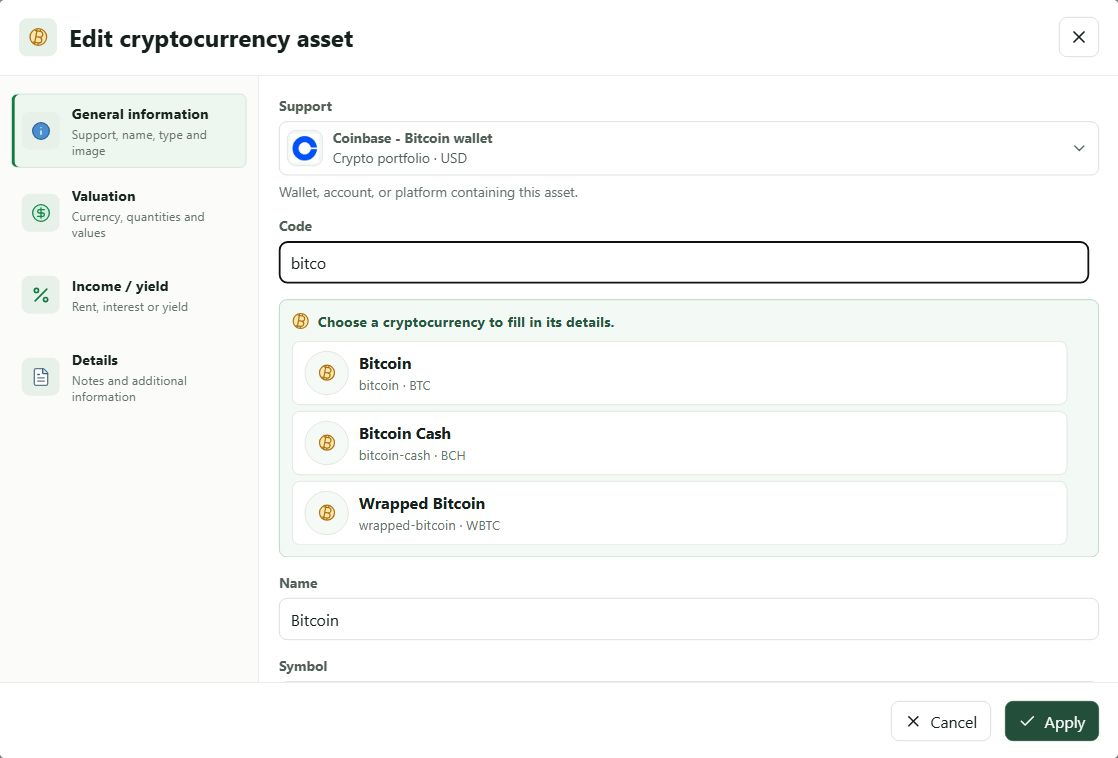
The My Wealth assistant can use My Wealth Live tools when the service and required access are available to find assets and retrieve market information, prices, exchange rates or images associated with recognised references.
This is essential: the language model runs locally, but can trigger external financial data searches through an optional service. These are distinct processing activities. For a Live search, the required identifiers or parameters are sent to the service; the complete wealth document does not need to be sent to an AI provider to process the local conversation.
For example, the assistant can help identify an asset, read information available through Live and prepare its addition to your wealth, subject to the applicable permissions and confirmations.
At the date of this comparison, Wealthfolio's assistant documentation says it cannot browse the web itself or fetch today's price. This does not mean Wealthfolio cannot update quotes: the application has its own market data providers. This comparison concerns the tools available to the conversational assistant, not the general presence of prices in the software.
Smart import that turns a screenshot into a review of changes
Imagine you have an eToro portfolio containing several ETFs, shares and cryptocurrencies. You want to update quantities and valuations without providing permanent access to your account.
On Windows, the My Wealth process is:
- From the relevant holding account's menu, open Smart import.
- Provide a portfolio screenshot or a supported export.
- Let the local AI model analyse the source.
- Examine the review: matched assets, proposed quantities, prices and values, and any suggested additions or deletions.
- Correct an uncertain match or figure, then choose which changes to apply.
- Apply the selected changes.
Then save your file if automatic saving is disabled.
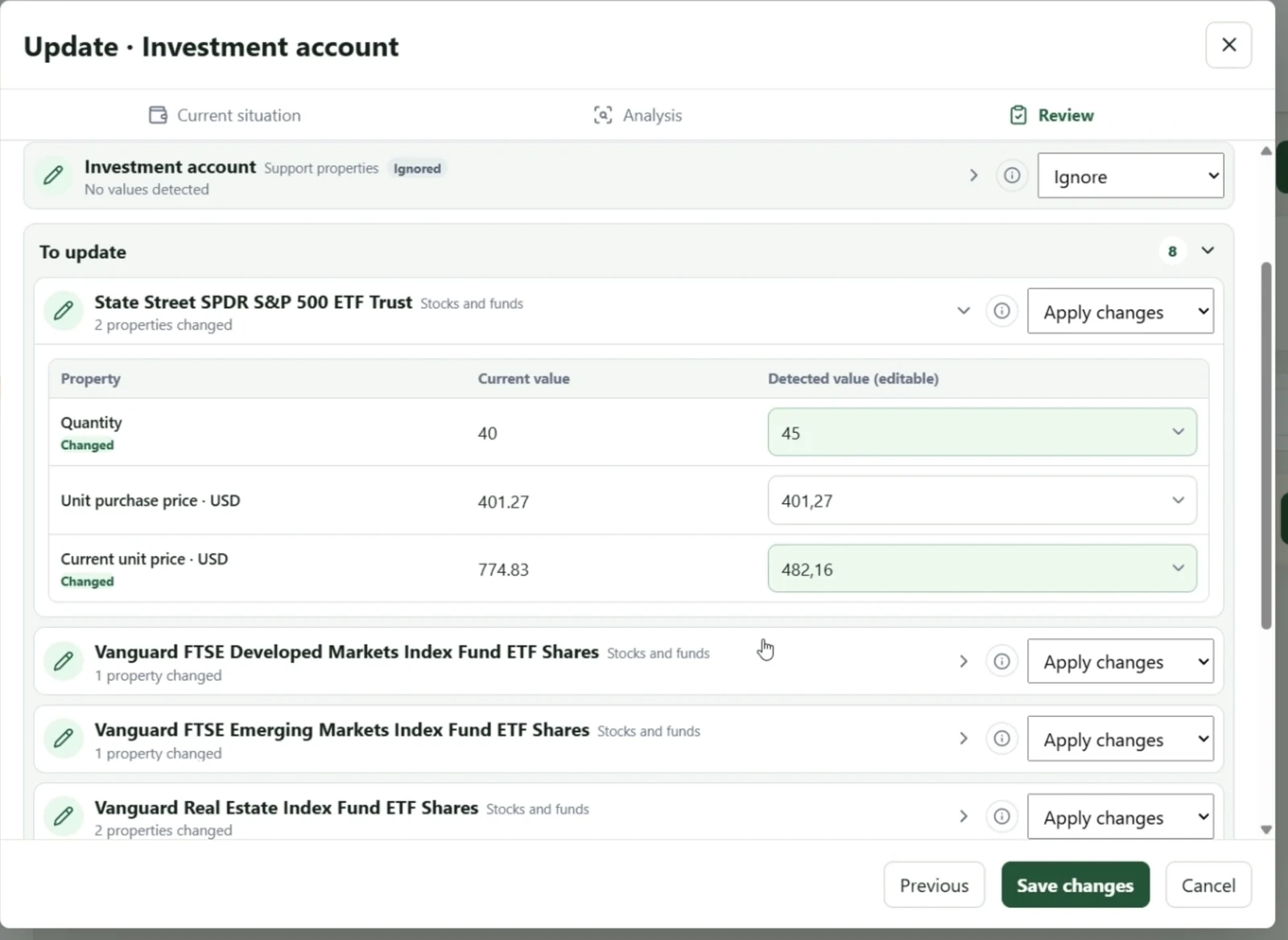
This example from a My Wealth demonstration shows the transition from an eToro screenshot to changes that can be examined line by line. The model can be wrong; a partial screenshot does not prove that an absent asset has been sold. My Wealth therefore presents proposals rather than an irreversible update carried out without checks.
This process does not require a bank connection and can work with different readable sources. It does not, however, guarantee recognition of every document or reconstruction of a complete history from a snapshot of positions.
Continuity between wealth, budget and goals
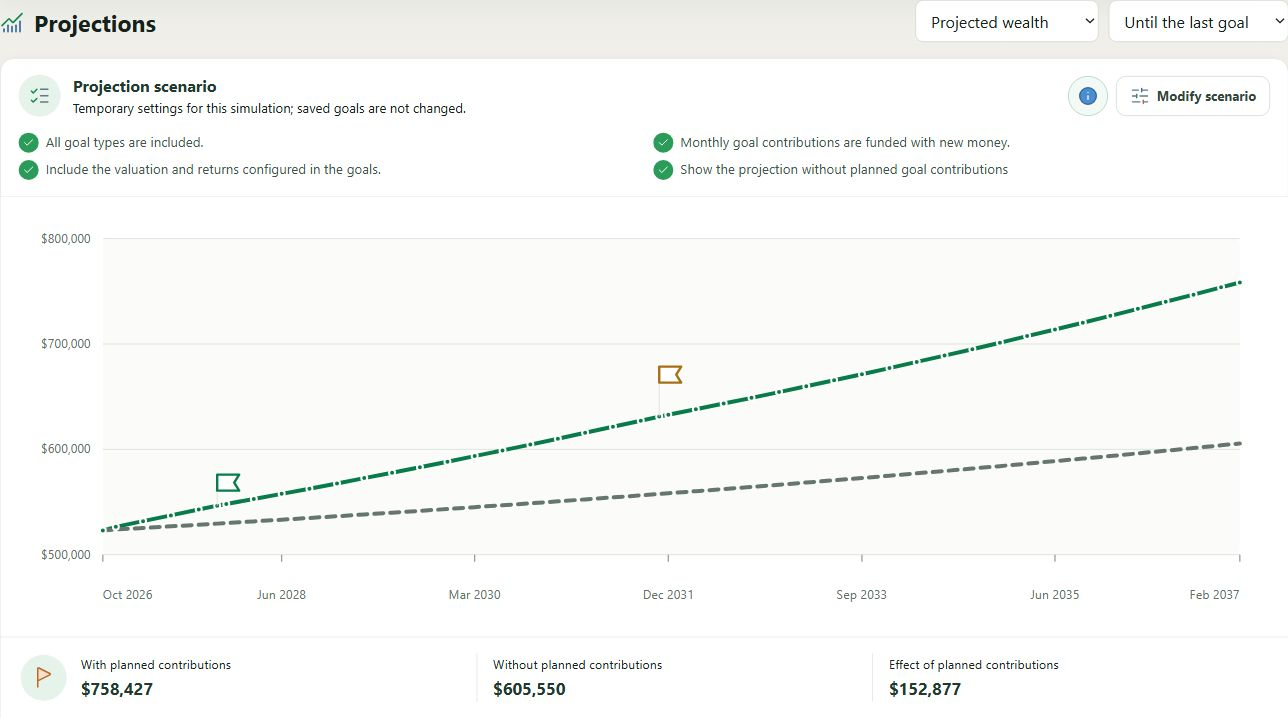
My Wealth does not isolate investments from the rest of your personal finances. You can track loans associated with properties, plan income and expenses, examine projected flows and define value, allocation or passive income goals.
Goals can be limited to certain assets or scopes and then projected using contribution and return assumptions. These projections are not performance promises. History and the change log then let you observe what actually changed.
4. Free features, subscriptions and services: compare equivalent uses
My Wealth is free for its wealth management features, with no limit on the number of assets under the product's current offering. Its local assistant and smart import on Windows are separate from the Live subscription. My Wealth Live costs 3.99 € per month or 39 € per year, with a ten-day free trial advertised on the publisher's website at the time of this comparison.
Live provides asset searches, available characteristics, images, prices and exchange rates. It does not synchronise your bank accounts and therefore does not replace the connection services offered by Finary, Kubera or Wealthfolio Connect.
Other publishers use different models: free desktop software and mobile options for Portfolio Performance; a free and open-source application and optional Connect for Wealthfolio; subscriptions by analysis level for Capitally; connected plans for Kubera and Finary. Prices, limits and trials can change, so check Finary pricing, Wealthfolio Connect, Capitally and Kubera before deciding.
Comparing only the cheapest subscriptions would be misleading: an on-demand stock price, bank synchronisation and detailed tax calculations are not the same service.
5. Which software should you choose for your needs?
| Your main need | Solutions to try first | Why |
|---|---|---|
| Manage complete wealth in a local file with budget, goals and a built-in AI assistant | My Wealth | Multiple asset classes and liabilities, local operation and updates under your control. |
| Track investments with open-source software and optional synchronisation | Wealthfolio | Local database, analyses, AI assistant and optional Connect. |
| Calculate returns, fees and taxes precisely | Capitally or Portfolio Performance | Transaction histories and detailed performance methods. |
| Automatically synchronise bank accounts and expenses | Finary | Aggregation of compatible institutions and connected budgeting features. |
| Consolidate diversified international wealth in an online service | Kubera | Financial connections, alternative assets and advanced wealth organisation. |
| Periodically update a portfolio from screenshots without connecting the broker | My Wealth; also evaluate Kubera | Both offer a file- or image-assisted process; My Wealth emphasises local analysis on Windows and review of differences. |
Your wealth may also call for two complementary tools: for example, wealth management software for the overall picture and a specialised application for tax or transaction history. No comparison replaces a trial using a few assets representative of your position.
6. Frequently asked questions
What is the best software for managing all your wealth?
There is no best application for every user. Prioritise software covering your asset classes, liabilities, currencies and preferred way of updating data. My Wealth is an option for local management of complete wealth; Finary or Kubera may better meet a need for automatic connections, while Capitally or Portfolio Performance may better suit advanced transaction analysis.
Is My Wealth really free?
Yes. Essential asset and liability tracking, analyses, budgets, goals and the local file are free. The optional My Wealth Live subscription covers connected financial data and catalogues, not access to core wealth management features.
Does My Wealth's local AI send my wealth to an AI provider?
For the assistant and smart import running locally on Windows, the model processes data on the computer without requiring the document to be sent to a remote AI provider. Optional My Wealth Live searches nevertheless need a network exchange to obtain requested data. An external MCP client using remote AI has its own rules for processing the information it reads.
Can an eToro portfolio be updated using a screenshot?
Yes. On Windows, launch Smart import from the relevant holding account's menu and provide a readable screenshot to a compatible local model. My Wealth prepares changes and lets you review them before applying them. Result quality varies with the source and model; human checking remains essential.
Do I need to connect my bank accounts to use My Wealth?
No. You can enter assets and liabilities, use manual update tools or analyse your own documents with compatible local AI. In return, My Wealth does not provide automatic bank synchronisation: you decide when to update your information.
Can an entire history be transferred automatically between competing applications?
Do not assume that every history, calculation, owner and attachment transfers perfectly. Formats and domain models vary. Before migrating, retain exports and original files, test a representative sample and check amounts, dates, quantities and currencies after import.
7. Discover My Wealth before choosing
You can try My Wealth for free in your browser with fictional wealth data to explore assets, analyses, income, the budget and goals. The online demo does not include the local AI assistant, smart import or My Wealth Live services. Live services are available in installed versions, depending on the licence.
To test screenshot analysis, proposed changes and the local assistant, use the Windows version with a compatible model.
Try the My Wealth demo · Download My Wealth for Windows
8. Comparison method and sources
This overview was prepared from publishers' official documentation and My Wealth's documented features, consulted on 24 October 2026. Descriptions are informational and are not a security audit, timed benchmark or verification of every commercial plan or hardware combination. Similar feature names do not guarantee the same operational scope.
Official sources consulted:
- Wealthfolio: application and platforms · Wealthfolio AI assistant · Wealthfolio Connect · changelog.
- Capitally: performance analysis · data security · imports · desktop and smartphone installation · plans and trial.
- Kubera: overview and plans · data security · mobile application · document and screenshot import.
- Finary: wealth tracking · AI connector · pricing · platforms and getting started · data security.
- Portfolio Performance: Portfolio Performance · performance methods · mobile application · mobile options and availability.
This page is written by Indrik Software, the publisher of My Wealth; it will be updated when significant changes have been verified.