
My Wealth: which savers and investors is it for?
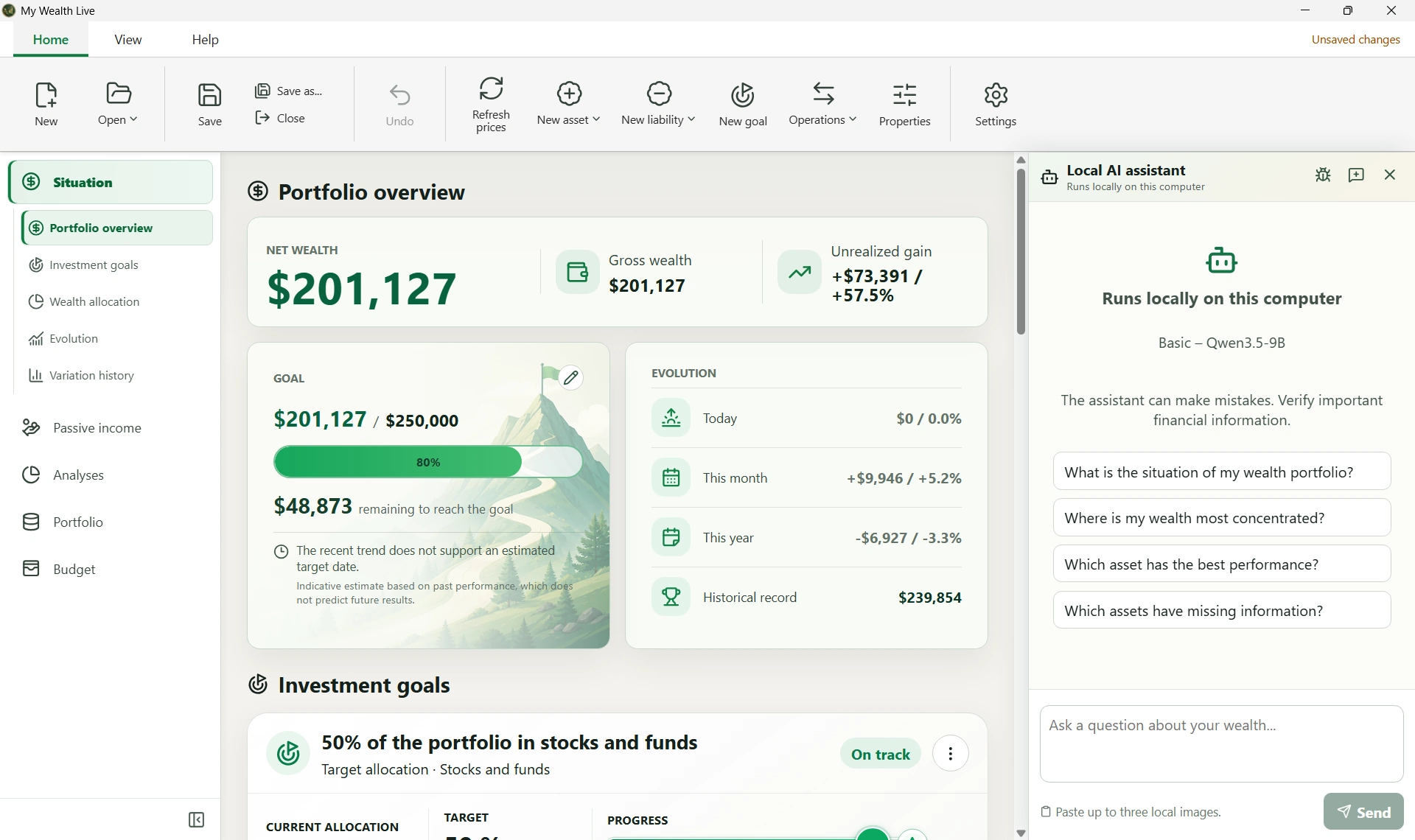
My Wealth is personal wealth management software for individuals who want to bring their accounts, investments, property and loans together in one application.
It may suit you if you are starting to organize your savings, invest across several asset classes, want to replace a spreadsheet or track your family's wealth. Its local operation also meets the needs of people who want to retain control over their financial data.
You do not need substantial wealth: a few accounts and investments are enough to get started. You can expand your tracking at your own pace.
You are starting to organize your wealth
Between a current account, savings, a few investments and perhaps a home with a mortgage, information can quickly become scattered.
My Wealth brings together what you own and what you owe to help you understand your overall position. You can track your assets' value and your net wealth after deducting debts.
You enter your information in the application; import features can supplement this entry depending on the supported formats. Bringing your accounts together in My Wealth therefore does not mean they are automatically synchronized with your banks.
To plan ahead, you can set goals: reach a value, adjust your investment allocation or target a passive income. A deadline and a planned monthly contribution let you compare your current position with your target.
Discover the wealth management software · Explore investment goals
You invest across several asset classes
My Wealth becomes particularly useful as your wealth diversifies: shares, ETFs, funds, real estate, French property investment companies (SCPI), cryptocurrencies, precious metals or readily available savings.
For example, you can track a home and its mortgage, a stock portfolio held with a broker and SCPI investments in a single view while retaining each investment's characteristics.
The analyses help you understand how your wealth is distributed by category, institution, currency or geographical area. You can also examine concentration, asset liquidity and debt.
If you hold assets abroad, their currencies are retained. A consolidated view is possible once the necessary exchange rates are entered.
Tracking rent, dividends and interest also lets you see how your investments contribute to your passive income, beyond their value alone.
Discover multi-asset tracking · Explore passive income tracking
You want to replace your Excel tracking
A spreadsheet is often convenient when starting out. As your tracking grows, however, you need to maintain formulas, add sheets, keep a history and rebuild charts.
My Wealth may suit you if you would rather spend your time understanding your wealth than maintaining your file.
The application provides a structure for assets, debts, income and goals, together with the associated calculations and views. Excel retains the advantage of considerable freedom for fully customized analyses; My Wealth provides a specialized framework for tracking wealth.
You can also plan a monthly budget for each account, including income, expenses, investments and transfers. This helps connect your monthly organization with the planned contributions towards your goals.
Compare My Wealth and Excel · Discover Budget and wealth
You track a couple's or household's wealth
Family wealth can combine jointly owned property and individually held investments.
My Wealth lets you identify owners and asset ownership. You retain an overview while being able to analyze items by owner.
This organization helps you understand who owns what and how the different items make up the household's wealth.
Managing multiple owners does not allow several people to edit the same file simultaneously. However, you can use your document in turn on different devices through a file synchronization service.
You want to retain control over your financial data
Your wealth is saved in a .mywealth file. The essential features for creating, viewing, editing and saving work without mandatory cloud storage or a user account.
You choose where to keep your document and how to back it up. On compatible platforms, you can also protect it with encryption.
You can save your My Wealth file in a synchronized folder, for example using OneDrive or Google Drive, to access it on your other devices, including Android. The chosen service handles synchronization automatically. Wait for it to finish before opening the file on another device and avoid editing it on multiple devices at the same time.
Connected services are complementary: they can enrich the available information, but your file remains the reference for your wealth.
This approach is particularly suitable if you want a specialized tool while keeping your wealth data under your control.
Discover how My Wealth works locally
What if you want to ask an AI about your wealth?
On Windows, a local AI assistant lets you ask natural-language questions about the information you authorize it to access. The application controls its access and requests confirmation for changes.
You can also request summaries and tables tailored to your questions, for example the five largest assets, with their value and percentage of your wealth.
Local AI and the MCP interface have been available on Windows since version 1.6. The assistant requires a compatible model to be installed and a computer with suitable resources.
More technical users can also explore MCP to connect compatible clients. These advanced features remain optional and are not available in the web demo.
Check the requirements and discover local AI and MCP
When should you choose another tool?
My Wealth focuses on personal wealth management. Some needs require a different approach:
| Your main need | What you should know |
|---|---|
| Several people editing the same wealth file at the same time | My Wealth does not offer simultaneous collaborative editing. |
| Professionally managing many clients' files | This is outside the application's current scope. |
Try My Wealth with a demo portfolio
The most useful way to find out whether the application matches how you manage your wealth is to explore its views.
The online demo provides a ready-made portfolio directly in your browser, with no installation. You can explore assets, analyses, passive income, budgets and goals.
The demo is for discovering the application: changes remain temporary and native features, including local AI, are not provided.