
Defining an investment goal
A goal always starts with a precise scope within the wealth file. My Wealth calculates the current value or income for this scope, then compares it with the target in the chosen currency.

1. Choosing the goal type
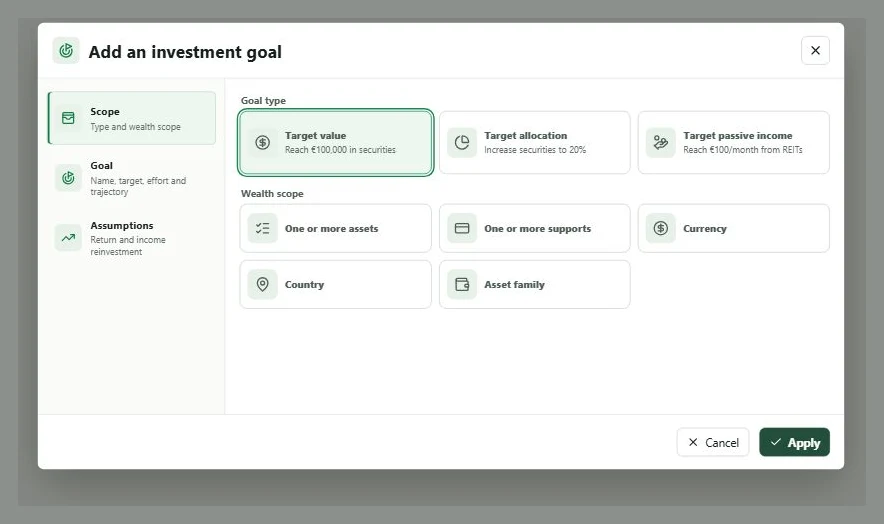
- Target value: for example, reach EUR 100,000 in a securities account.
- Target allocation: for example, bring stocks and funds to 50% of positive gross wealth.
- Target passive income: for example, reach EUR 500 net per month across several assets.
2. Defining the scope
- In Situation or Passive income, select New goal. From the budget, use Add an investment goal.
- Choose the Goal type.
- Under Wealth scope, choose a family, country, asset, several assets, one or more supports, or a currency according to the available type.
- Select the exact items. For multiple assets, use the search, then check the number selected.
A Currency scope contains exactly one currency. A scope made up of several assets or supports may contain several currencies.
3. Entering the target in the correct currency
- Enter the Name and Target.
- For a target value or passive income, choose the target currency. My Wealth suggests the main currency when the scope contains multiple currencies, but you can always change it.
- Check the Current net value or Current passive income displayed in the dialogue. It must be converted into this target currency.
Example: a CHF 20,000 goal may cover several assets in EUR and CHF. The target, current value, and monthly investment are all displayed in CHF. The required rates must exist in the wealth file.
4. Choosing between a monthly payment and target date
Under Monthly investment calculation:
- choose Set a monthly payment to enter what you can invest; My Wealth calculates the estimated date;
- choose Reach the goal by a given date to enter the deadline; My Wealth calculates the Required effort.
The summary compares the Planned investment with the required effort and states whether it is sufficient, insufficient, or appropriate.
5. Configuring assumptions
For a target value, enable annual valuation only if you want to simulate price growth. For an income goal, choose the observed yield of the scope or a positive custom yield. Treat income as reinvested reduces the calculated personal effort by reusing generated income.
These assumptions support the trajectory; they do not guarantee a future return. If the projection is Not calculable, open the details and correct the indicated field: scope, target, date, yield, or exchange rate.
6. Adding the effort to the budget
After confirmation, choose Add to Budget and select the account that will finance the goal. The line carries the planned monthly investment. If you choose Not now, you can add it later from the budgeted account's menu.
The budget always displays this line in the account's currency: a goal in CHF appears in EUR on an account in EUR and remains in CHF on an account in CHF.
Pausing the goal preserves its configuration but suspends tracking. Deleting it also deletes its linked Budget lines after confirmation.