
Managing owners and ownership shares
In My Wealth, owners are not assigned directly to assets or liabilities. They are associated with supports, together with their ownership shares. Assets and liabilities linked to a support then use this ownership.
Creating owners
- Open Properties > Owners.
- Add each person or organisation that may own a support in the wealth file.
- Designate the main owner.
- Apply the properties.
The main owner is used by default in calculations that need an allocation when no explicit ownership is defined. As soon as a support has its own owners, their allocation applies to the assets and liabilities linked to it.
Defining ownership on a support
When creating or editing a support:
- select the relevant owner or owners;
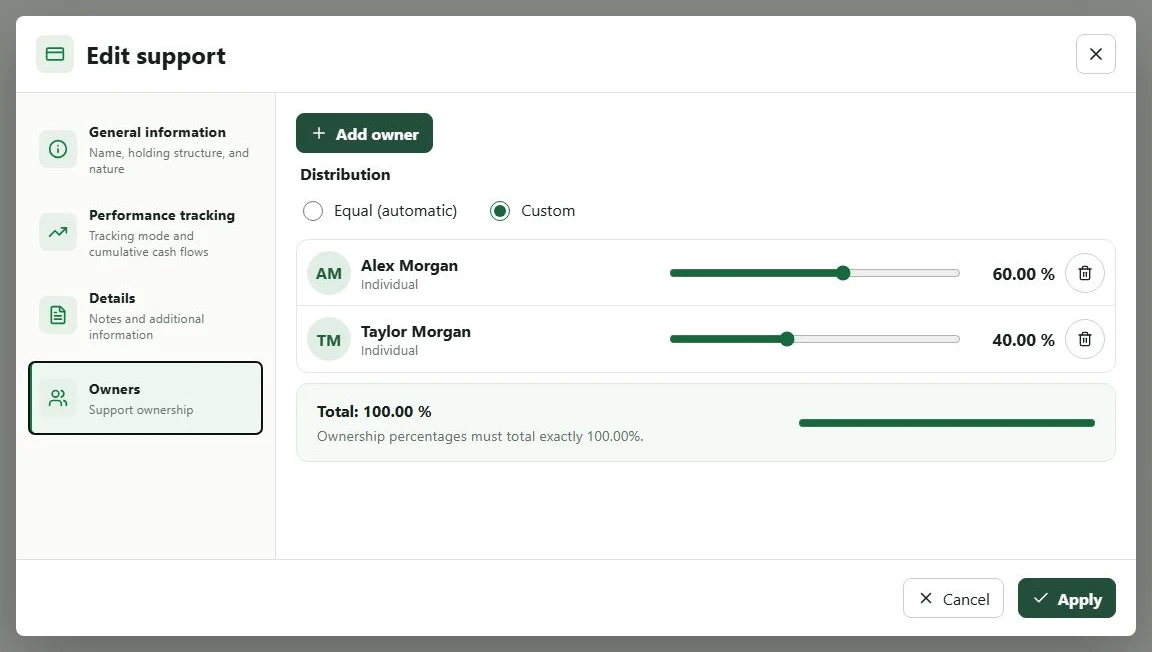
- choose Equal (automatic) to divide the support equally, or Custom to enter each percentage;
- in custom mode, check that the total reaches
100%; - apply the support.
Assets and liabilities associated with this support then require no direct owner: they use the support's ownership.
You can leave an asset or liability without a support by selecting None. In this case, no explicit ownership is carried by a support, and the main owner is used as a reference in the relevant allocations.
Example: a securities account with two owners
For a securities account owned 60% by one person and 40% by another:
- create both owners;
- create the
Securities accountsupport; - define the 60/40 allocation on this support;
- link the relevant ETFs, shares, or funds to the same support.
Ownership is thereby defined only once. Adding a new ETF to the securities account does not require entering the owners again: simply associate it with the support.
Assets and liabilities follow the same principle
An asset and a liability can be linked to the same support when they belong to the same holding structure. For example, property and the loan that finances it can share the support that carries the owners and their shares.
If ownership changes, edit the relevant support first. This avoids contradictory allocations across several assets or liabilities.
Checking consistency
After changing ownership of a support, return to views that offer a scope or owner filter and check that linked items appear within the expected scope.
Permissions for the local AI assistant or MCP are stored at wealth-file level and do not replace support ownership information.