
Understanding the .mywealth file structure
A .mywealth file brings your wealth together in one document: its current position, its history and its associated images. You can copy this file to keep or move your wealth. The page on saving and protecting data explains how to make a backup and use encryption.
1. The parts of the file
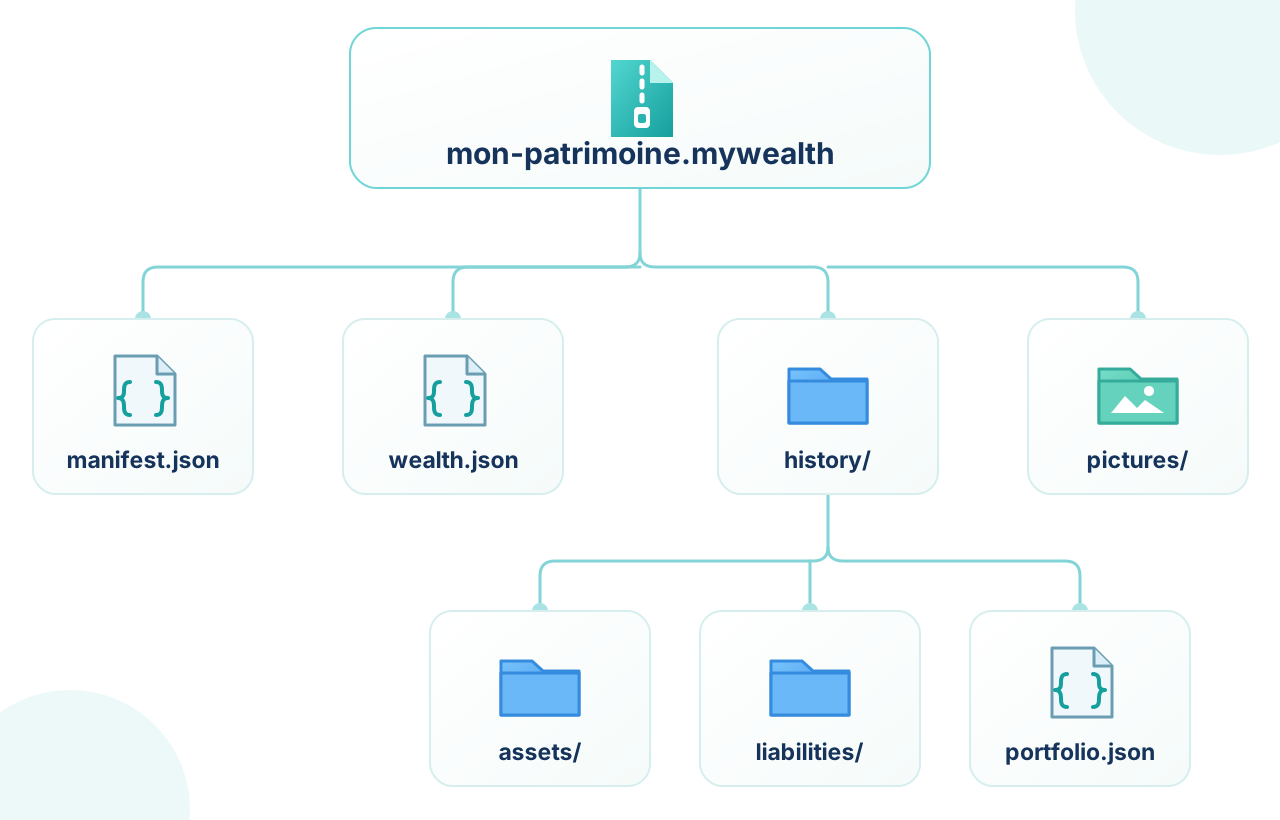
An unencrypted file is a ZIP archive. Inside it, information is organised as follows:
| Part | Role |
|---|---|
manifest.json | Describes the file format and indicates where to find the document, history files and images. |
wealth.json | Contains the current position: owners, institutions, investment vehicles, assets, liabilities, budgets, goals, recorded exchange rates, permissions and update tracking. |
history/ | Contains history files for the wealth and its items, including property changes and values recorded over time. |
pictures/ | Contains images used in the wealth file, if any. The document references them without repeating their data each time they are used. |
File names and JSON data use UTF-8 encoding. The internal structure may evolve with My Wealth versions; the application reads compatible files and saves them in the current format.
2. A format designed to last
The file is organised to remain understandable: the current position, histories and images each have their place, while the manifest tells you how to find them. This separation makes the format easier to maintain and evolve with future My Wealth versions.
If you stop using My Wealth, your data do not become inaccessible. In an unencrypted copy, JSON files can be read with common tools and used as a starting point for transferring data to another program. Today, AI assistants such as ChatGPT or Claude can also convert these data to another program's format. For an encrypted file, the password remains essential to access its contents.
3. Unencrypted or password-protected files
In an unencrypted file, archive software can read the ZIP archive and its internal files. The .mywealth extension identifies it as a My Wealth document, but does not protect its contents.
When you enable encryption in My Wealth, an encrypted envelope protects the entire archive. Its contents can no longer be read like an ordinary ZIP archive. The password is needed to reopen the document; My Wealth cannot recover it if you lose it.
A .bak backup is a copy of the file as it stood when the backup was created. It therefore retains the protection and password that applied to that version of the file.
4. Examining the structure without changing the document
To examine internal files, work on an unencrypted copy and open it read-only with archive software. Editing wealth.json, the manifest or files in history/ directly can make the document unreadable or inconsistent. To change your wealth, use My Wealth's commands and save the file normally.